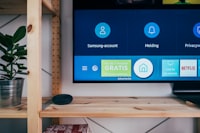
Two features separate a genuinely good IPTV experience from a frustrating one, and neither has anything to do with the number of channels: catch-up TV and the EPG. You might see them advertised as "7-day catch-up," "replay," or simply "EPG included" — but the reality varies enormously between providers.
This guide explains what IPTV catch-up and the EPG actually do, how they work together, and the exact checks to run before you subscribe so you don't discover the limitations a month into a paid plan.
What Is IPTV Catch-Up TV?
Catch-up lets you rewatch content that already aired — without setting a recording. Open the EPG, scroll back to an earlier programme, press play, and the stream replays it. It's effectively a rolling, server-side recording window that the provider maintains for you.
- The window matters — some providers offer 24 hours, others 72 hours or a full 7 days
- Coverage varies by channel — a provider may have catch-up for UK linear channels but nothing for international ones
- It's usually available across devices — the same catch-up catalogue is served to Firestick, Smart TV, phone and tablet
What Is the EPG?
The EPG (Electronic Programme Guide) is the TV schedule displayed in your player app — programme names, times, now/next and upcoming listings for every channel. A good EPG turns 18,000 channels from a scrolling list into something you can actually navigate. A bad EPG is why some people bounce off IPTV entirely.
Key things to verify about a provider's EPG: accuracy (are times and titles right?), coverage (are your key channels listed, including international ones?), and language (many appreciate a multilanguage EPG to match their content).
How Catch-Up and EPG Work Together
Catch-up is driven by the EPG. You discover past programmes from the EPG window, then replay them. If the EPG data is wrong, catch-up becomes guesswork; if there's no catch-up, accurate EPG data at least helps you plan. The two features live and die together, which is why you should test both during a free trial.
How the Channel List Is Usually Structured
A good international provider doesn''t just add channels — it organises them by language and region, so your EPG stays usable. Typical structure is a series of country or language folders: India & South Asia, Pakistan, Arabic, Turkey, Poland, Romania, Philippines and more. Flagship sports and movie channels usually appear in their own category with HD and 4K variants listed separately, and many providers pin a small set of "VIP" international channels at the top of the list for one-click access. When you''re browsing a channel list during a trial, skim for two things: the regional folders you care about, and whether the channels inside them are duplicated or genuinely distinct streams.
| Regional Folder | Typical Content | What to Verify |
|---|---|---|
| India & South Asia | Hindi, Tamil, Telugu, Punjabi & Kannada entertainment, news, movies, cricket | Bollywood premieres, catch-up window, cricket 4K |
| Arabic | MENA drama, movies, news, sports | Sports tournaments in 4K, regional drama availability |
| Poland & Eastern Europe | Polish, Romanian, Bulgarian channels, sports & film tiers | Polish sports HD, film premiere timing |
| Others | Turkish, Filipino, Portuguese, Caribbean | Local HD quality, EPG language |
What to Check Before You Subscribe
- Ask the exact catch-up window — 24h, 72h or 7 days? And is it universal or limited to certain channels?
- Check EPG coverage for your channels — especially international and smaller channels, which often have the spotty data
- Verify timeshift support — can you pause and rewind live TV, or is it replay-only after the programme ends?
- Test multi-device — catch-up should follow your login across TV, phone and tablet
Common Catch-Up Limitations to Know Up Front
- Not every channel has catch-up — providers often enable replay only for the main entertainment and sports channels, not the full 18,000-channel list
- Replay expiries differ by content — movie channels may keep premieres for days while live sport expires after hours
- Catch-up isn''t recording — you can''t save a replay permanently or edit it; you''re watching on the provider''s window
- Fast-forward on catch-up is limited — most players only allow resume or small jumps, not full scrubbing
If you regularly miss big matches, the sports catch-up window is the single most important number on the provider''s spec sheet. 24 hours means you can rewatch tonight but not next week; 7 days means the whole match week is recoverable. Ask outright before you pay.
Common EPG Problems and Quick Fixes
EPG issues usually come from bad source data, stale cache, or timezone settings. If programmes show at the wrong hour, the first fix is your timezone configuration — our EPG timezone converter tool and the EPG setup guide walk through it step by step. If specific channels are permanently wrong while others are fine, that's provider-side data you can't fix remotely — another data point for your buying decision.
How to Check Catch-Up Coverage for Your Specific Channels
Provider marketing always emphasises the catch-up window but rarely the coverage. The practical test is channel-specific: the channels you actually watch. During a trial, scroll through your top ten channels in the EPG, pick a programme that aired an hour ago, and try to replay it on each one. That reveals exactly how much of the list the provider''s catch-up system actually covers — and it usually looks very different from the marketing sheet, in both directions. Favour providers where replay works on the channels you live in, not just the flagship dozens.
Test the Same Programme on Two Devices
Log in on your TV and phone, replay the same catch-up title on both, and check whether playback position syncs. Seamless multi-device catch-up is a genuinely premium feature.
Test During Peak Hours
Replay servers are load-balanced just like live streams. If catch-up buffers at 8 PM on a weekend, you''ll notice it every Saturday — test at the time you''ll actually watch.
Recording vs Catch-Up
If catch-up replay windows are too short for you, recording gives permanent control. With IPTV you can record live streams to local storage (on supported apps) or to the cloud — but the recording features depend on the player app and device, not the provider. Our full guide to recording IPTV and catch-up explains the practical differences and which apps handle it best.
The Pixel Check: A Fast EPG Quality Test
You can gauge a provider''s EPG quality in under two minutes. Do this during your free trial: pick five random channels — one UK, one sports, one movie, one international, one local — and check whether each shows now/next, full day listings, and correct times. Then scroll to tomorrow and repeat. A provider with solid EPG data passes on four or five of them; a provider sourcing cheap data fails on most. Since the EPG drives catch-up, this tiny test predicts the quality of the entire replay experience.
Does a Good Provider Offer Both?
Honestly? Yes. A provider serious about the experience — and confident in its EPG data — advertises accurate EPG and a meaningful catch-up window as a feature. Earnest IPTV's subscription includes EPG and catch-up across the main channel sections, and we're happy to demonstrate exactly how it behaves on your device with a free 24-hour test line. You don't have to take our word for it.
Frequently Asked Questions
What is IPTV catch-up TV?
Catch-up lets you rewatch programmes that aired in the last 24-72 hours (sometimes 7 days) from the channel's EPG. You press back on a past programme and it replays, without recording or a separate device.
What does EPG mean in IPTV?
EPG stands for Electronic Programme Guide — the on-screen TV schedule. A good EPG shows accurate programme titles, start times and now/next information for every channel, often in multiple languages.
Do I need catch-up and EPG to use IPTV?
No — live channels work without them. But without a reliable EPG, finding what you want to watch is guesswork, and without catch-up you'll miss content when you're busy or travelling. Both dramatically improve the experience.
Why is the EPG on some IPTV channels wrong?
EPG data is provided by the channel source and refreshed periodically. Smaller or international channels often have patchier data or wrong time zones. If a provider's EPG is consistently wrong, that's a quality signal worth noting before you buy.
Conclusion
Catch-up and the EPG are the features that turn a raw list of streams into something you can actually live with every day. Buy with the checks above, confirm the window and EPG coverage during a free trial, and you won't discover their limits the hard way.
Want to see catch-up and EPG working properly before you commit? Get a free 24h test line and try the features yourself, or compare our plans.